Governed administration for Jira Cloud

Safe bulk operations and cleanup for Jira Cloud

Admin Ops for Jira® gives administrators the offboarding, bulk-edit and housekeeping tools a growing instance needs, with a preview, a confirmation and an audit record for every change. Nothing changes until you have seen it.

Free for up to 10 users. Billed through your Atlassian account.

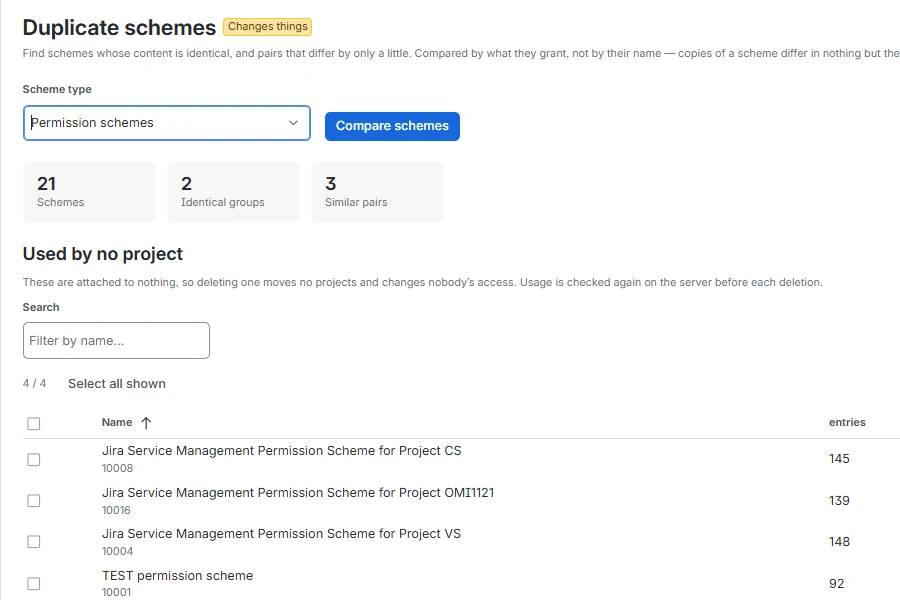
Admin Ops · Configuration · Duplicate schemes
Duplicate schemes screen: 21 permission schemes compared by content, with 2 identical groups, 3 similar pairs and a list of schemes no project uses.
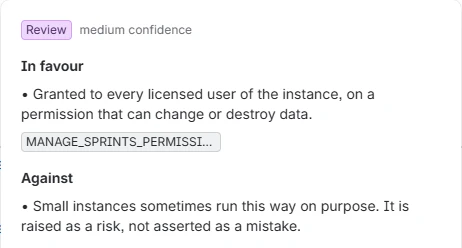
Recommendation popup with the verdict Review, medium confidence, and the evidence for and against it.

What it does

Three jobs every Jira administrator has, done properly

Offboarding & access

Move a leaver’s filters and dashboards to a new owner, remove group access without deleting the account, and find the grants held by one named person.

  • Reassign ownership, object by object
  • Revoke group access, reversibly
  • Audit every permission scheme

Configuration cleanup

Find what Jira cannot show you: schemes identical in content, custom fields nobody fills in, screens nothing references, filters saving the same query.

  • Duplicate schemes, fields and filters
  • Unused screens and custom fields
  • Orphaned filters and dashboards

Bulk changes

Label, set a field, transition, move or delete issues by JQL through Jira’s native bulk API, acting on exactly the issues the preview showed.

  • Up to 1,000 issues per run
  • Pinned, single-use preview set
  • Per-issue result with Jira’s reason

Safety model

One pattern for every change

Whether a label goes onto 400 issues or five schemes become one, every tool that changes something follows the same three steps.

  1. 1

    Preview

    A dry run lists every affected object with what the decision depends on: query, shares, favourites, last use. Every row can be deselected. Nothing in Jira changes.

  2. 2

    Confirm

    Anything irreversible opens a dialog that names each object and lists what stops working afterwards. It runs only after you type a word.

  3. 3

    Run and record

    The server re-derives the objects and acts on the set the preview pinned. The log records who started what, and the outcome for each object.

Try the confirmation step

Delete 3 filters permanently

Filters have no trash in Jira. A deleted filter cannot be restored.

  • MOBL (Open) · 1 share, 1 favourite
  • Old sprint view · private, no favourites
  • HR copy 3 · 2 shares, 4 favourites, 1 subscription

What this changes

  • Dashboard gadgets on these filters show an error instead of data.
  • Subscriptions stop. Whoever received the filter by e-mail silently stops receiving it.
  • 4 favourites are lost without the people concerned being told.
This cannot be undone.
A demo on this page. Nothing is deleted.

Features

Over 20 purpose-built tools in six areas

Every screen states its effect beside its heading. Half of them only read, so an instance can be reviewed before anything changes.

Reads only changes neither Jira nor the app’s settingsChanges things always with preview and confirmation

Site health

One view across every audit, for the question an administrator asks first: does anything need attention right now?

  • Site healthReads only

Users & access

Who can reach what, and what happens to the objects of someone who leaves, including the Jira Service Management customers and organizations behind a portal.

  • Reassign ownershipChanges things
  • Revoke accessChanges things
  • Permission auditReads only
  • Duplicate accountsReads only
  • Jira Service Management customersChanges things
  • OrganizationsChanges things
  • Create customersChanges things

Filters & dashboards

What piles up over the years, who owns it, who still uses it, and what breaks if it goes.

  • Bulk filtersChanges things
  • Bulk dashboardsChanges things
  • Clone dashboardsChanges things
  • Orphaned objectsChanges things
  • Duplicate filtersChanges things

Issues

One JQL query, one operation, applied through Jira’s own asynchronous bulk API.

  • Bulk operationsChanges things

Custom fields

Jira Cloud allows 700 custom fields and slows down well before that. Both screens reduce the count without losing data.

  • Custom field usageChanges things
  • Duplicate fieldsChanges things

Configuration, log & help

What remains when projects and workflows are retired, who among your administrators may use the app, and the record of everything it has done.

  • Duplicate schemesChanges things
  • ScreensChanges things
  • Issue type usageReads only
  • Archive & trashChanges things
  • App accessChanges things
  • Jobs & auditReads only
  • HelpReads only

See all features

For enterprise administration

Built for instances where a mistake reaches hundreds of people

Admin Ops does not widen what administrators can do. It makes the work faster, and every step visible, reviewable and attributable.

Roles within your admin team

Assign auditor (read only), operator (read and change) or owner to named administrators. Enforced on the server for every request, and every policy change is logged.

Fits your change process

The preview names every object and makes a sound attachment to a change ticket. The log is the evidence afterwards. The app does not pretend to be an approval workflow.

Attributable in three places

Every change appears in the app’s log, in Jira’s own audit log and in issue history, always under the administrator who ran it.

Scales without sampling

Scans run in slices and resume, so a large instance costs time rather than completeness. Caps are reported, never applied silently.

A proven rollout sequence

  1. Read-only auditsPermission audit, field usage, archive & trash. Nothing to undo.
  2. Reversible changesReassign ownership, make a filter private, revoke a membership.
  3. The safe half of cleanupSchemes no project uses. Nobody’s access changes.
  4. One irreversible objectOne screen, one scheme group. Read the result first.
  5. Bulk issue operationsAdd label first; delete and move last.

Read the rollout guide →

Security & compliance

A short security review, because there is little to review

Admin Ops runs entirely on Atlassian Forge. There is no vendor infrastructure in the path, and we as the vendor never receive your data.

QuestionAnswer
Where does the app run?Entirely on Atlassian Forge, inside your Atlassian tenant.
Does any data leave Atlassian?No. The app declares no external endpoints and makes no external calls.
Are there sub-processors?None. No data is sent anywhere.
Does the app hold privileges of its own?No. Every call runs as the administrator using it, so Jira’s permissions always apply.
What is stored?An audit log of the 50 most recent runs, the access policy and a ten-minute preview set, in Forge storage inside your tenant.
What happens on uninstall?All stored data is removed. There is no vendor-side copy.

Security & compliance details

Pricing

Simple licensing through your Atlassian account

From 11 users

Per user

A tiered price per user and month, with the unit price falling as your user count grows. The Marketplace shows the price for your tier.

Without an active licence

Read only

Previews, audits, recommendations and the log stay available. Review your instance before you buy, and keep your log if a subscription lapses.

BillingThrough your existing Atlassian account. Atlassian is the merchant of record.
TermsThe standard Atlassian Marketplace end user agreement. No separate contract.
SupportMonday to Friday, business hours (CET). First response within one business day.

FAQ

Questions administrators ask before installing

Who can use the app?
Jira administrators only. Every backend call re-verifies the Administer Jira permission. Under App access you can narrow it further to auditor, operator or owner for named administrators.
Can changes be undone?
Some by running the opposite operation: reassigning ownership back, re-adding a group, re-sharing a filter. Deleting issues, filters, dashboards, screens, schemes or workflows cannot be undone, because Jira has no trash for them. That is why the confirmation dialog names every object. Custom fields are only ever moved to the trash, restorable for 60 days.
Does the app put load on my instance?
It makes ordinary REST calls as your account, and only when somebody presses a button. The one background task is a weekly personal-data report that Atlassian requires of every app storing personal data; it reads only the app’s own storage. There are no webhooks.
How large can my instance be?
Scans run in slices of about twelve seconds and resume where they stopped, so there is no record ceiling. Where a scan did run short, the app says so and treats its figures as a lower bound.
Is there a Data Center version?
No. Admin Ops is a Forge app for Jira Cloud.
Which languages does the app support?
English and German. The app follows the language set in each administrator’s Atlassian profile.
How do I get support?
Through our support portal, or by e-mail to support@vi2va.de. Please quote the version number shown at the bottom of every screen in the app.
Start by seeing what your instance is carrying around

The read-only audits work even without a licence. Nothing changes until you decide it should.